...
The geographical area we want to work with today is defined by its lower-left corner [20oN, 110oW] and its upper-right corner [70oN, 30oW].
Have a look at the subpage documentation to learn how to setup a projection .
...
| Section |
|---|
| Column |
|---|
| | Info |
|---|
|
| Useful input parameters |
|---|
input_x_values | | input_y_values |
| Useful Graph parameters |
|---|
| graph_line | | graph_line_colour |
|
| Code Block |
|---|
| theme | Confluence |
|---|
| language | python |
|---|
| title | Python - Adding a line |
|---|
| collapse | true |
|---|
| from Magics.macro import *
#setting the output
output = output(
output_formats = ['png'],
output_name = "map_step7",
output_name_first_page_number = "off"
)
#---------------------------------------
# definition of the previous layers
# ...
# ...
#---------------------------------------
#definition of the Xsection Line
xsection = minput(
input_x_values = [-7490., -60.],
input_y_values = [4150., 30.]
)
#definition of the graph
line = mgraph(
graph_line_colour = "black",
graph_line_thickness = 4
)
plot(output, area, coast, precip, shading, msl, contour, new_york, point, xsection, line, legend) |
|
| Column |
|---|
| 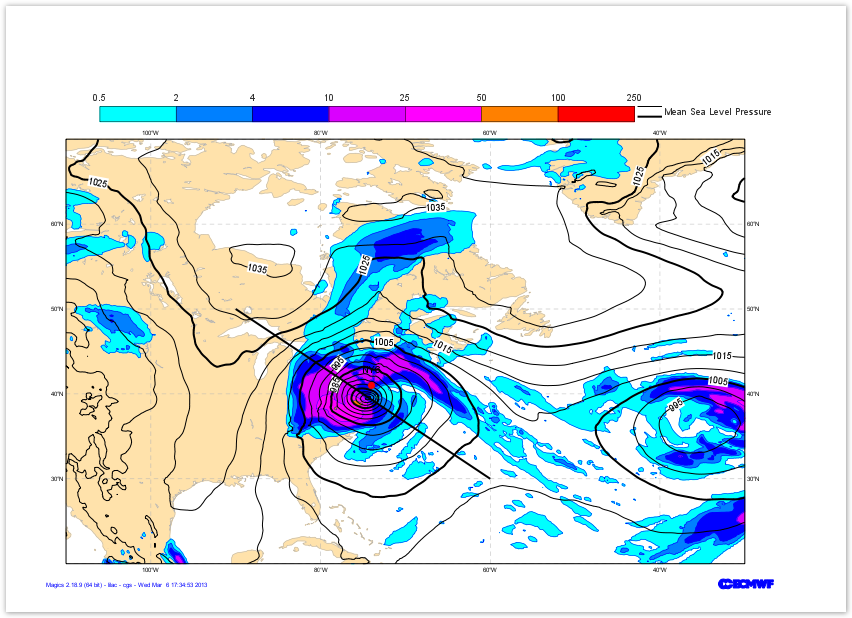 |
|
...