IMPORTANT: This procedure will not work if you are using an incognito/private tab
- Go to a ECMWF Website, the main WWW will do ( but the process wil work also if you go to other websites .e.g: eccharts ) https://www.ecmwf.int
- Try to Log in, in this case, you have the "Log in" on the top right
| |
- Once you have reached the main Login page, look for the "Forgot Password" option. That's what will allow you to set a new password. Click there.
| 
|
- There isn't much to explain here, just write here the email of the account you want to reset its password.
- If the account exists an email will be sent to that address with an special temporal link that will allow you to reset the password.
- Of course this assume you have the control of that email ( you can read its inbox ).
| |
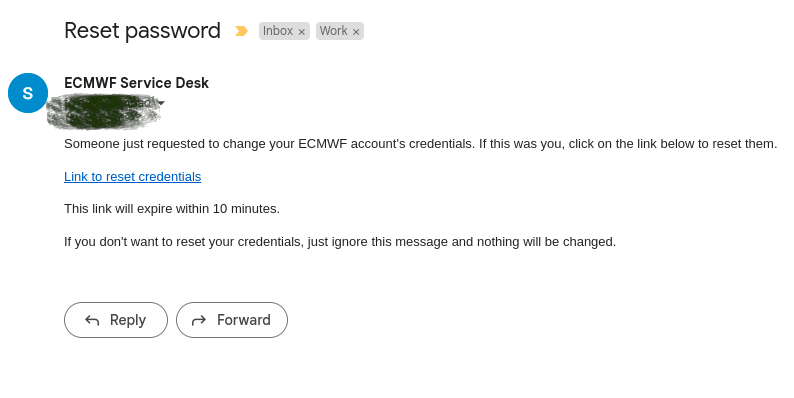
- You will receive an email in your inbox like this one.
- Please note the "Link to reset credentials" : That is a link that you must click and it will take you to a form where you can update the password
- Also note that this link is limited in time for a few minutes.
| |
- That is the form to which you will arrive if you click on the previous link in the email
- Now you can choose the new password, you have to write it twice for confirmation.
- There are restrictions on the password quality. If the system considers the password is too weak it will be report it to you with further instructions/details
| |
 Steven Deacon, last updated by Cesar Lombao on Dec 15, 2025
2 minute read
Steven Deacon, last updated by Cesar Lombao on Dec 15, 2025
2 minute read