-
Created by
 Francesco Murdaca, last updated by Jorge Loaiciga-Rodriguez on Oct 19, 2026
4 minute read
Francesco Murdaca, last updated by Jorge Loaiciga-Rodriguez on Oct 19, 2026
4 minute read
Part of this offering is opt-in and once deployed, is responsibility of users to maintain and update (i.e. Execute and Submit nodes). Feel free to ask for feedback in the #peer-support channel on EWC Discussion Platform
Introduction
Many problems in Earth Observation and modelling communities require a common processing algorithm independently applied to thousands (or millions!) of bits of input data. A system to do this with many processing nodes is "High Throughput Computing" (vs "High Performance Computing", which concentrates on running large jobs that will not fit on a single machine on a pool of processing nodes, typically using MPI).
EWC provides a common solution for HTC batch processing, using HTCondor. The major advantage of this approach is that it provides a centrally-managed system where users can take advantage of a much larger pool of resources than they have themselves. The resources come from tenants contributing their spare resources for the common good, and additional spare resources from EWC that are also made available for anyone to use.
The common EWC solution for HTC batch processing service is HTCondor. HTCondor is a specialized batch system for managing compute-intensive jobs. HTCondor provides a queuing mechanism, scheduling policy, priority scheme, and resource classifications.
Users can submit their compute jobs to HTCondor, HTCondor puts the jobs in a queue, runs them, and then informs the user as to the result.
Of course, any tenant can install their own batch processing systems for their own purposes with their own resources, but will not be able to take advantage of other shared resources in a centrally organised way.
Service Architecture
EWC HTcondor is a managed service. The central manager node is deployed in a tenancy on the EWC. Users can join the existing pool adding compute and submit nodes.
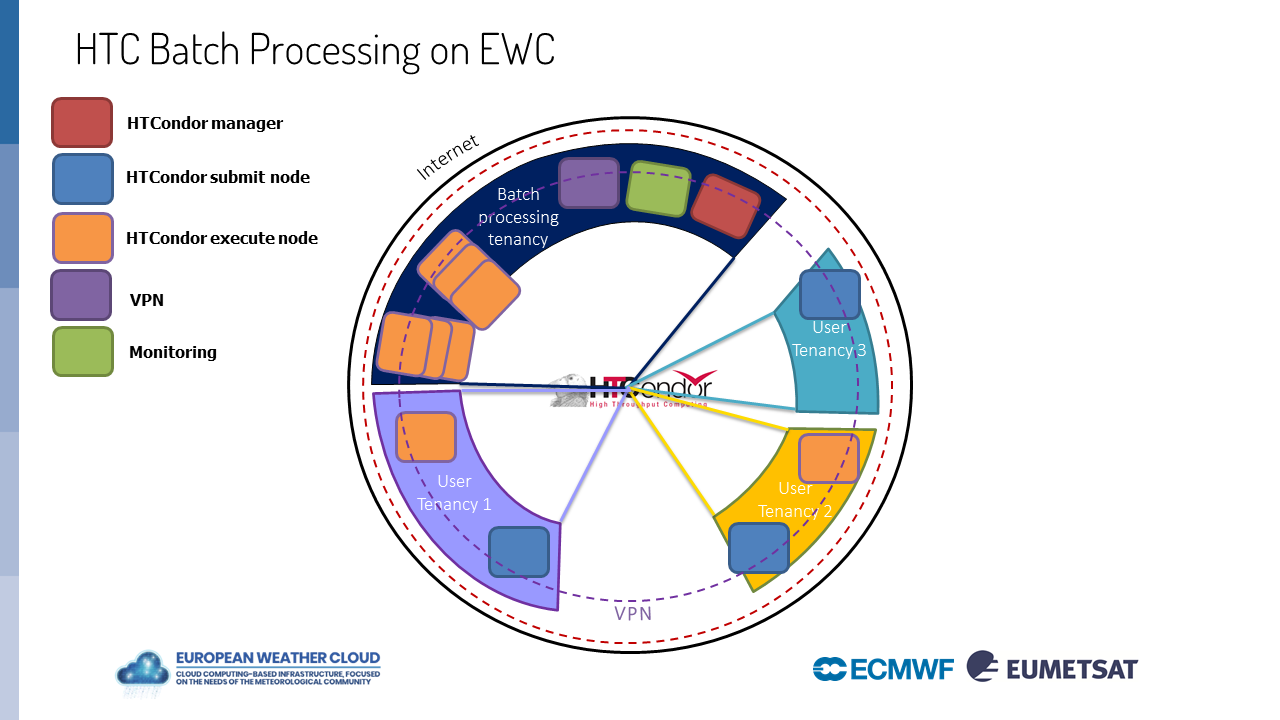
Some features of the HTCondor in EWC:
Maintenance | Centrally Managed Tenancy, easy 'one click' deployment |
Deployment | Multi tenancy |
Resource | Join automatically the main HTCondor Pool, no need for password or any configuration, only choose the plan for the machine your want to add |
Usage | Easy 'one click' deployment, simple examples for running a job with docker universe |
Network | VPN, which allows processing nodes in a tenancy to communicate with the scheduler / master nodes |
Scheduling | Single schedulers in each tenancy, no possibility to erase other tenancies jobs |
User-facing nodes
Execute nodes
- No access to execute host for containers
- No access to other containers running on execute node
- Isolated environment for containers
- No autoscaling
- No NFS
Submit nodes
- Vanilla (Bash), Docker, and Singularity universes allowed
- Only a relevant subset of condor command allowed (condor_submit, condor_status, condor_rm, etc.)
- Private network in the tenancy enabled to allow access to tenancy-internal resources/files
- Condor transfer mechanism allowed
How to provision Execute nodes or Submit nodes
If provisioning after August of 2026, we recommend deploying based on the community hub, to benefit form upcoming features or fixes.
Pre-requisites
Security Group
You may create security groups either via legacy Morpheus UI settings (available until end of 2026) OR via Community Hub Item deployment. Once your tenancy is onboarded into the EWC IAM, you may also create security groups via the EWC Cloud Management UI settings.
Create a designated security group with a descriptive name (e.g. "htcondor" ) and add to it the following rules:
| Name | Direction | Rule Type | Protocol | Port Range | Source Type | Source | Destination Type | Destination Port Range |
|---|---|---|---|---|---|---|---|---|
| HTCONDOR | ingress | Custom Rule | TCP | 9618 | Network | 0.0.0.0/0 | Instance | |
| SSH | ingress | Custom Rule | TCP | 22 | Network | 0.0.0.0/0 | Instance |
Deployment based on the EWC Community Hub
Checkout the corresponding Community Hub Items:
If you wish to know how to deploy this and other Items via the EWCCLI, please see EWC User Stories: I want to deploy an Hub Item using the ewccli.
Using HTCondor nodes
Submitting Jobs
- SSH into your submit node
- Create a simple job:
# dockertest.sub -- example docker job

universe                = docker
docker_image            = debian
executable              = /bin/cat
arguments               = /etc/hosts
should_transfer_files   = YES
when_to_transfer_output = ON_EXIT
log                     = log/job_$(Process)_sleep.log
output                  = output/job_$(Process)_output.txt
error                   = error/job_$(Process)_errors.txt

request_cpus   = 1
request_memory = 1024M
request_disk   = 10240K

queue 10
- Use condor_submit dockertest.sub
- Verify jobs are running, using condor_q command
Checking Jobs Status
- SSH into your submit node
- Check if the node appears in the list of execute nodes, running condor_status
Docker universe job in HTCondor
Try this tutorial on how to create a container and push it to a registry using docker. Moreover it provides an example job that can be submitted to HTCondor. If you cannot use public container registry, you can use EUMETSAT - Container Registry for HTC Batch Processing and Kubernetes specifically added for this purpose mainly.
Singularity job in HTCondor
Since May 2025, EWC HTC batch processing introduced the possibility to run singularity jobs. Singularity (https://sylabs.io/singularity/) is a container runtime system popular in scientific and HPC communities. HTCondor can run jobs inside Singularity containers.
Submit nodes created before April 2025, will fail when trying to run singularity jobs. In order to enable running singularity jobs, you need to provision a new submit node.
Try this tutorial example job that can be submitted to HTCondor.
Additional resources
Full documentation specific to HTCondor can be found on the official documentation website.