-
Created by
 Sigurdur Bjartmar, last updated by Francesco Murdaca on Apr 15, 2026
2 minute read
Sigurdur Bjartmar, last updated by Francesco Murdaca on Apr 15, 2026
2 minute read
We recommend to use S3 CLI tools to manage S3 buckets as Morpheus is going to be decommissioned. Please consult Object Storage: using command line for more information.
Step-by-step guide
In order to be able to decrypt secrets in Cypher, you need to have ewcloud-tenant-admin role for your user in Morpheus! If you have ewcloud-user role only, please ask the tenant admin of the tenancy.
- Navigate to Cypher from Morpheus (Tools → Cypher).
- Note down your Bucket Access Key and Bucket Secret key
- Navigate to Storage (Infrastructure → Storage).
- Click + Add and choose a name for your bucket. Fill in the Access Key and Secret Key fields with the keys located in Cypher.
- The EUMETSAT endpoint is https://s3.waw3-1.cloudferro.com.
- The ECMWF endpoint are (depending on which cloud cluster is linked to the tenancy - this can be checked under Infrastructure->Clouds):
- CCI1 cluster : https://object-store.os-api.cci1.ecmwf.int
- CCI2 cluster : https://object-store.os-api.cci2.ecmwf.int
- For ECMWF : check the option "USE PATH STYLE BUCKET ACCESS"
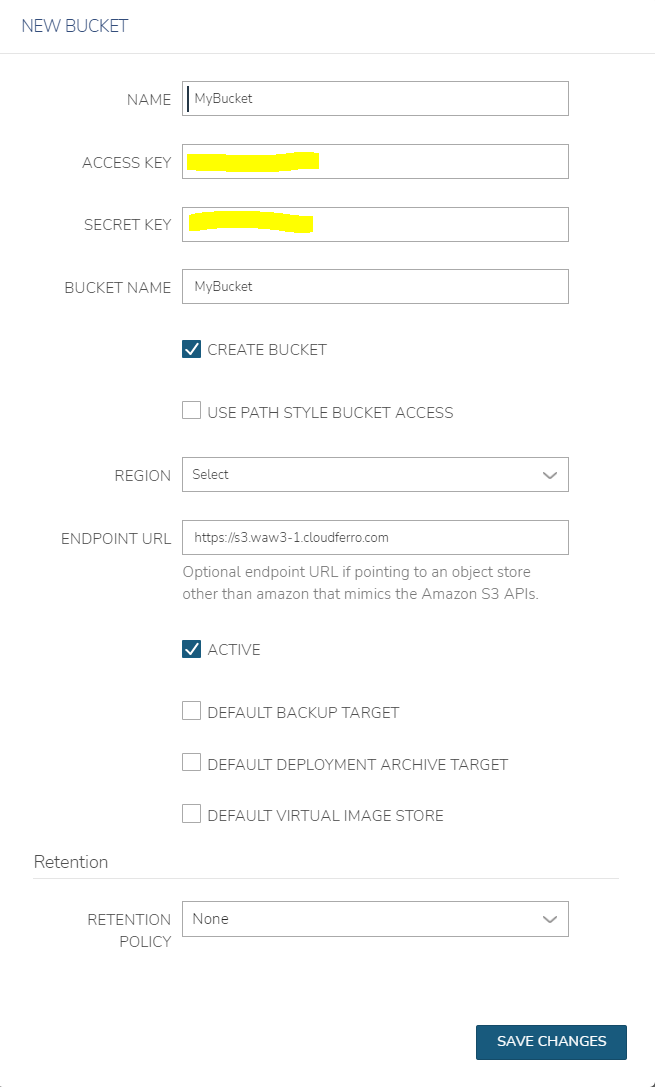
5. Hit Save Changes. Now your bucket should spawn. For more info on how to access buckets, see related articles.